Saturday, April 25, 2009

The Substance of Style

This is really for another post, but it all started with Claudia Kotchak’s talk on bringing design into the DNA of Proctor and Gamble. In that talk Kotchak mentions Virginia Postrel’s book The Substance of Style. I just finished reading it and I highly recommend it. It is a fairly easy read, I mostly read it on the subway while on vacation in New York, and it is thought provoking. How you will be provoked depends on where you are coming from I suppose.

Being a designer, I wasn’t provoked by the claim that there is value in style and that surface sells. I really didn’t get provoked until the sixth and final chapter in which Virginia Postrel pre-empted my criticism of the book stating that instead of telling the world how much more design is than mere style, designers should take pride in providing value through surface modifications. It is on page 178 in the paper back. I have still not quite accepted that statement…

Honestly, I had a really hard time getting through chapter 1, chapter 2 was only a little better and it wasn’t really till chapter 4 that I felt I was actually learning something. But that may be because I really did not need convincing that design makes sense.

What the book really gave me was a language to talk about the changes from earlier periods of one style to rule them all to a modern day notion of a multitude of equally valid styles.

The book also provided me a lot of good food for thought on what design mean to identity. This is something I have been thinking quite a bit about recently and Postrel terms it well in talking about going from “I like that” to “I am like that” i.e. the style of the objects you surround yourself with are used to express who you are and what you aspire to.

Chapter 4 and 5 were probably my favorite chapters. Chapter 4 deals with the Boundaries of Design and covers issues such as city planning, committees that determine design with or without an agenda. Both are bad.

Chapter 5 is about being Smart & Pretty and how the two are combined, raising the bar for entry into any category. This is something I personally work with everyday, talking about how all applications / websites are dated i.e. presents a thinking from a given area. If for instance you produce an application that today that looks like Outlook 2003 then you are simply not meeting the barrier to entry for a modern day application.

One favorite quote from chapter 5 is

Aesthetics is pre-rational or nonrational, not irrational or antirational. (p. 171)

I think I will use that quote in a conversation soon :)

Chapter 5 also covers the cost of aesthetics and goes on to state that the (sad?) truth is that aesthetics is not often not about making more money anymore, but about staying in business. It is not an added and valued extra, but a requirement. I suppose this really only is sad if you are a designer and you thought you main value add was in style. (see, I can’t let go of that notion).

A little criticism

It does seem to me that Postrel tips over into the too post-modernist camp and states that because there is no one style that everyone follows, then everyone has many styles. I simply do not buy that. Everyone has one major style or maybe a public/work style and a private style and of course there are times when our style is adopted to the situation for instance when we attend formal events such as funerals or weddings. 

But it is worth reading, and funny

The book is filled with interesting examples. One funny example is the about the cultural context of something as simple as a color. Today blue is associated with business, but in ancient Rome it was the color of weakness and in the twelfth-century France it was the color of the monarchy. (pp 94-95).

And if you want to learn more

If you want to learn more, visit Virginia Postrel's website, read about the book:The Substance of Style. Or spend 17 minutes on this TED2004 talk on Glamour, also by Virginia Postrel.


All references are to the paperback. On Amazon: http://www.amazon.com/Substance-Style-Aesthetic-Remaking-Consciousness/dp/0060933852

Filtering in Active Directory Administrative Center

This is the post I have wanted to write for a long time. I had to wait until the designs had been shown in public (see bottom of this post). This is also the latest in a series on filter designs.

Let’s get back to our original goal of…

…making a filtering mechanism that works well for the majority of cases. ‘Works well’ means that it is easy to use and complete enough to cover 95% of the scenarios of the people who use our products. Getting deep on Filtering

We have looked at a number of different examples of Attribute based filtering and we need something that is as good as the Zune filter yet is much more scalable.

Enter the design for Active Directory Administrative Center. This is the application in all it simple might and glory once you have navigated to a folder (called Organizational Unit in Active Directory) full of user accounts.

filterQuery2

In the following screens we will focus in on the list area:

image

  1. A: Title. Tells you the name of the folder and number of items in the folder or the number of items in the filter
  2. B: Free text filter. Filters across most attributes
  3. C: Add criteria button. Lets you add rules or attributes to your query
  4. D: Saved queries.
  5. E: Button for saving the current filter.

If you type in the free-text filter we filter the list as you type and update the title with (“number of matching records” of “total number of records”):image

We also change the background color to indicate that the list is filtered.  Hit ESC to clear the free-text filter. CTRL+E will set focus on the free-text filter.

We added the free-text filter because most times you can get by with a quick search even when you have a couple of thousand records in a given folder. If you have more than a couple of thousand records you may need more advanced filtering. The ‘Add criteria button’ provides a set of rules (see Different kinds of Filtering) and a list of attributes to filter on. Active Directory Administrative Center lets you filter on about 20 attributes. From a pure design point of view that number could be much bigger. From this applications’ perspective, we went through rounds of user testing to figure out what the right attributes were to include and it did simply not make sense to include all 150 or so attributes.

We added the idea of rules for two reasons. First of they are a helping hand in what we expect a lot of people to be filtering on all the time such as for instance “users with disabled/enabled accounts” which is really just a shortcut for “Object type = user AND Account state = disabled/enabled”. Rules can also be a way to package a filter that would otherwise not be possible to make with this design. More on that later.

The ‘Add criteria button’:image 

As soon as we add the ‘users with disabled/enabled accounts’ rule the filter is updated. image

To get the enabled accounts, simply click on the link “disabled” and you will get a dropdown with possible values.  And we could of course have added more than one rule and several attributes. Here is just one more attribute:

image

Notice the ‘and’ in the beginning of each line? We automatically AND the free-text filter and the rules and attributes together. this gets us to the core of this filter design:

Criteria on different attributes are AND’ed and Criteria on the same attribute are OR’ed.

Here is an example of this design rationale in effect:image

In the example above we have created a filter for

((Name starts with ‘t’) OR (Name starts with ‘a’)) AND (Type = User) AND (Free-text contains ‘hund’)

We do not allow you change the Boolean operators, and we do not allow you change the attribute once it has been added. you can remove a criteria (click the red x) and add new attributes. We do not allow you change the Boolean operators or change the attribute because that way we can take care of grouping automatically and prevent filters where you get the too much due to wrongly grouped ORs (the Cartesian product) or nothing at all due to wrongly placed ANDs.

On one hand we have avoided the raw Boolean logic exposed in products such as Winamp which we know most people have a really hard time getting right, and on the other hand we have avoided jumping through hoops as Itunes does or created a design that is inherently limited as Zune has done. 

We also have created a design that can take care of about 95% of the scenarios. And if 95% is too little there is room to improve it through rules that target special cases where a set of criteria across different attributes should be OR’ed. We don’t ship any of those in Active Directory Administrative Center. We could not come up with any even through extensive user testing.

What about the last 5%?

The Active Directory team has put a lot of effort into PowerShell in Windows Server 2008 R2 so if you need a really advanced filter you can always go to command line. The alternative would be to make a GUI design that covers all cases, but honestly, I don’t believe we could do that and still keep it usable. This is a trade-off, but by not designing for all edge cases we also don’t pollute the experience for the majority of people using the application.

A little more on this specific Design

I am sure you could implement the core design idea differently and still get a great design. The following covers some specific choices we made for this implementation of the idea.

To get the query shown above we first selected Name and Type

image

image

…and then added Name again…

image

The new criteria is inserted under the existing criteria for Name and indented and OR’ed.

image

This may seem like a round-about way of adding the same attribute twice, but we chose to do it this first of all because we believe most filters will only use the same attribute once, and second because this allows us to insert the second instance of an attribute at the right spot and hence both take care of grouping and get it to visually line up without having to move criteria around after you have already interacted with them.

If you are an Active Directory admin you may very well be working across multiple domains. If you have 2 domains, say ‘Corp’ and ‘Sub’ and you want to find users with expired accounts in the User OU of either domain, you can create the query anywhere, save it and reapply it in a different OU:

image

I hope you have enjoyed reading about filtering as much as I have enjoyed designing for it and writing about it and if you have comments or questions, please leave them here or catch me at Twitter @rulerbreaker.

Credits

Like all other designs this was a team effort.  A lot of people from our UX team (Twitter @MS_ITPro_UX) have contributed and it should go without saying that so have the great Program Mangers, Developers, and Testers who have worked on this.

Active Directory Administrative Center will ship as part of Windows Server 2008 R2 which means it is not out yet but has been presented at TEC and will also be touched upon at TechEd 2009 (session SIA326 “What Windows Server 2008 R2 Does for Your Active Directory”).

Friday, April 10, 2009

Social trails

Don Norman talks about how we in the real world use the actions of others to find our own way. He has used exampels such as seeing people waiting on the train means that the train has not arrived yet, or that a path through some grass being an indication of a need for a path there. Very interesting and insightful, but I can't help but wonder if maybe it applies less to software. I think that in software, at least ideally, we look at what people really do and then change the application to fit their workflow.

What I am really trying to understand is if it is better to build trails ofbither people into software, or if it makes more sense to just change the software.

There are probably cases for both approaches.

Saturday, March 14, 2009

Zune –on Filtering

Zune has, in my opinion, nailed the core insight in attribute based filtering: Criteria on the same attribute should be OR’ed and criteria on different attributes should be AND’ed.

There is no mentioning of AND or OR In the Zune autoplaylist UI. You also do not have to select between ANY or ALL as you do in ITunes. It is simply all built in and just works the way you would expect it to work.

Zune’s autoplaylist has two defining characteristics. First, there is a predefined set of attributes you can filter on. You cannot add additional attributes which means Zune does not need to expose groupings. Second, the dropdowns used to pick values to filter on automatically makes the ORs between the values.

Zune1

Below is a screenshot of the dropdown. When picking what album artist to filter on, you can pick multiple entries from the list.

Zune2

Here I have picked NOFX and the dropdown has added a semicolon to indicate that more can be added. Similar to typing in email addresses.

Zune4

You can also just type text in the dropdown which is the same as a ‘contains’ operator.

Zune6

Above we have created our example from previous posts:

(Album artist name is NOFX OR Offspring OR contains ‘Bad’) AND rating is Like

Zune5

When it comes to music players, I think the Zune autoplaylist UI is the best i have ever used. The only reason to not just copy it is really that its strength is also its weakness. It cannot be expanded to include a lot more attributes.

Next we will finally look at the filter in Active Directory Administrative Center.

Thursday, March 12, 2009

ITunes –on Filtering

ITunes, another media player, another attribute based filtering mechanism for dynamic playlists. And another solution to how you let people create complicated queries yet hide the complexity.

The Smart playlist UI in ITunes starts out much like other players letting you pick an attribute, operator, and type or pick an operand.

ItunesOperators

ITunes is different form other players however when you add more than one criteria. The top part of the dialog changes from “match the following rule” to “Match all/any the following rules” wich is of course shorthand for “AND all the rules together” or “OR all the rules together”.

ItunesRatingAllAny 

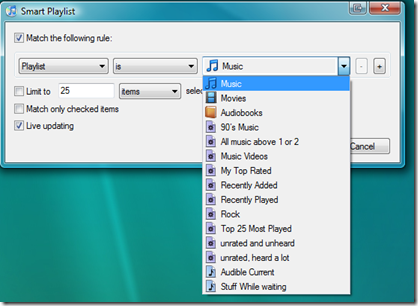
Assume we saved the playlist in the above picture as “All music above 1 or 2”. It would simply show us every song in our library not rated either 1 or 2 including unrated songs. Useful, but a little broad.

If we want to create a playlist of all Metal that is either unrated or rated above 2 stars we could not do that with matching either ALL or ANY of the criteria. If we chose all we would ask to skip songs that were rated both 1 and 2 stars and were of the genre Metal. Clearly an empty list because a song cannot be rated both 1 and 2. If on the other hand we OR them all together we would get all music because songs rated 1 would not be rated 2 and the other way around.

To overcome this problem without compromising the simplicity of the UI ITunes has introduced one of my favorite features when it comes to filtering in media players: The ability to use a playlist as a criteria in another playlist:

ItuneBasedOnPlaylists

This is a bit of a crazy feature, but very cool once you understand it. Each playlist essentially works as a reusable group of criteria which allows us to get our Metal playlist without the songs we have rated 1 or 2 stars:

ItuneBasedOnPlaylists2

I would expect people to object to this idea of reusable playlists  as being a strange or silly solution to the problem and I would not be surprised if someone brought forth the argument that it is convoluted and that there must be a better solution.

I personally think it is elegant and powerful. And useful in enterprise scenarios. Imagine that you were running a campaign targeting large companies in different countries. In Denmark a large company may be defined as one with more than 5.000 employees while large in the US may be defined as companies with at least 15.000 employees. With reusable criteria you could define “large Danish companies” and “large US companies” as separate playlists and reuse them in queries about your past sales, you current open orders, overdue invoices and so forth.

What’s next?

Next up is Zune. A limited/focused solution (pick your point of view) that in my mind is the most elegant solution so far.

Playlists in Windows Media Player –on Filtering

Like other media players, Windows Media player has an auto Playlist feature. WMP has also realized that providing people with raw access to Boolean logic will usually not resolve in a good experience and so has opted for a solution where it is very clear and easy how to add criteria, but as we shall see, it breaks down quickly if we try to create our example from WinAmp.

When we create an auto playlist we get this screen…WMPStart

and when we click on the green plus sign we get the standard 3 step filter design of

  1. Pick an attribute
  2. Pick an operator
  3. Write or pick an operand

WMP2

If you want to make a playlist for a band or a genre this works brilliantly. It is very easy to create for instance the playlist you can see below of “All songs by Goldfinger where my rating is at least 3 stars”.

wmp3

If, however, we were to create the same playlist as in the WinAmp example:

Artist is (NOFX OR Offspring) and Rating is at least 3

we would get in trouble. Windows Media Player ANDs everything within a group together. In the following example I wanted to make a playlist for Punk and Jazz rated at least 3 stars, but because the Genres are AND’ed the result will alwyas be an empty playlist because a song cannot be both Jazz and punk i.e. it cannot have two genres.

WMP_Genre1

Because every criteria within a group is AND’ed you must repeat common criteria across groups to get the expected result. Below I had to add the criteria for rating to both Punk and Jazz. Had I only added it to Punk the result would have been “Punk rated at least 3 stars and all Jazz” which is not what we want.

WMP_Genre3

What’s next?

Next we will look at ITunes and its interesting tricks and after that we will look at Zune and finally we will take a look at the Attribute based filtering in Windows Server 2008 R2 Active Directory Administrative Center.

Tuesday, March 3, 2009

Would you buy a car from Chevy right now?

Does good UI mean anything for business software? The people who will make the purchase decision usually aren’t the people who will actually use the software, so even though, for the end-user, the interface is the system it should not matter to the people with the money.

Of course you can talk about TCO, about the time it takes to train people, and how enjoyment of work leads to more productive people. But at the end of the day, I think what really matters, is that the people who are about to shell out a substantial amount of money can see that you, the seller, cares and is investing in the software.

This was brought up by a friend of mine from a different product group. They have recently released a completely revamped product. New backend, new UI, some new functionality. My friend said that the experience selling this product is substantially different form the other products form the same division. First of all, the UI looks new and modern and people want to like it. Once they have gone through the rest of the system and everything checks out to be modern and have a future, the buyers get really excited. They can see that we are investing in the product and that gives them confidence.

Which leads me to the car analogy. Chevy does not have a good track record on quality, but the newest version of the Malibu has received very positive feedback. Yet, I am not sure I would personally buy a Chevy car. Not because the individual car may not be of high quality, but because the overall system that it is a part of is not sound. I honestly don’t know if Chevy is going to be around to honor the guarantee or supply spare parts. I have lost faith in the company more so than in the product.

I think something similar is at stake in business software. The product may be technically great or the UI may look spiffy, but unless you can show how you are investing in both and that you are prepared to keep investing, I don’t think you have a compelling case.

Now, please do not think that I don’t think the UI should work well, but just look great, of course it should be great. I actually believe in the TCO, training, and enjoyment arguments above, but the first usage of the UI is not when people start using the software, but on the box or in the sales situation.